Using time data to improve project cost management
.png)
Introduction
Project costs spiraling out of control can only mean one thing: trouble.
When tracking project costs falls by the wayside, managers are left with the unpleasant task of informing stakeholders and making tough decisions to bring the project back on track.
Time tracking is one of the most effective tools available for project cost control, especially when it comes to labor costs. This guide will show you how to use work time tracking data and time tracking tools for better project budget tracking and how to avoid the cost overruns that put projects, and client relationships, at risk.
Why accurate time tracking matters for project management
Time tracking in project management is not a pointless formality: it is a crucial component of successful project management, with significant benefits for both project managers and their teams. Tracking tasks and checking status updates is not enough: knowing how time is spent on each task, project phase, and client ( and how individual team members are allocating their hours) is equally essential.
With accurate time tracking paired with project management, you gain a clear picture of where every hour goes.
Here are some examples:
- Full visibility: Managers get 360-degree visibility on how the team spends time across all active projects.
- Team capacity insights: They gain visibility into team status and workload: who is working on what, and how much resources remain.
- Client and project breakdown: They can identify which project or client is consuming the most time and resources.
- Early issue detection: All of these insights help project managers spot issues early, identify trends, and correct course before costs escalate.
- Labor cost tracking: Most importnantly, time tracking enables accurate tracking of hourly labor costs, thanks to built-in features available in most modern time tracking tools (more on that below).
How time tracking helps with tracking project costs
As mentioned above, time tracking supports several aspects of project management, including project cost control. While time tracking alone is not sufficient to manage the full complexity of project cost management, it is still a critical piece of the puzzle. This is true not only for companies working on fixed-fee projects, but especially for those that bill by the hour.
Here is how time tracking directly supports tracking project costs:
- Real-time project monitoring: Tracking time consistently helps keep projects on track by providing a real-time view of how time is being spent across the project, its phases, and individual tasks as the work progresses.
- Billable hours tracking: Knowing exactly what every hour of work is costing (and earning!) is crucial to overall project health and company profitability. Accurate billable hours tracking ensures nothing slips through the cracks.
- Project budget tracking: When a project has a defined monetary budget, linking expenses to tracked time ensures project leaders always know how the budget is progressing. This also applies to hourly budgets: a project that takes longer than planned immediately translates into additional costs in terms of time and resources.
- Visibility and clarity: Time tracking makes status updates more straightforward, provides a consistent picture of work in progress, and, most importantly, helps leaders identify issues and bottlenecks early. Managers know when a project risks going off track and can take action before costs balloon out of control.
Common methods for tracking project costs
There are several approaches project managers use for tracking project costs. Each has its pros and cons:
Spreadsheets
Easy to set up and familiar to almost everyone, spreadsheets are a widely used method for tracking hours, project milestones, and project costs. They are versatile and require little to no installation. Their ease of use is a clear advantage; however, spreadsheets also have significant drawbacks when it comes to scalability. As a project portfolio grows in size and complexity, manually filling rows of data becomes error-prone and difficult to maintain.
Project Management Tools
Many teams rely on project management (PM) software to manage the lifecycle of a project from kickoff to completion. These comprehensive tools support teams in updating statuses, milestones, tasks, dependencies, subtasks, and blockers. They often include some form of time and expense tracking. However, their all-in-one nature can be a double-edged sword: while ideal for managing everything project-related, they can be complex to configure, challenging for users without specific training, and costly to license.
Dedicated Time Tracking Tools Integrated with Project Management
Time tracking tools specifically designed with hour and productivity tracking in mind can support project management as a seamless addition, reducing complexity rather than adding to it. Most time tracking tools integrate directly with project management platforms, giving teams an easy and reliable way to track time, monitor hourly project costs, manage hourly budgets, and in most cases log expenses as well.
Best time tracking Tools with Cost Tracking Features
If you are looking for tools built to support tracking project costs alongside time, here are some of the most widely used options:
- Lucen Track — purpose-built for time and cost tracking, with budget management and integrations with popular PM tools AND the Microsoft Suite
- Hubstaff — strong time tracking and workforce management features with cost reporting
- Toggl Track — simple, intuitive time tracking with project profitability reporting
- Harvest — time and expense tracking with built-in invoicing and budget alerts
Try Track today
Discover how to manage project costs, time, budgets and much more
Why add time tracking to your project management workflow?
Adding a new tool to your existing workflow might not sound exaclty like simplifying things. If you’re skeptical at this point, we get it.
However, by combining time tracking with your PM tool, you get the best of both worlds.
Project management software does not always include a time tracking feature, and when it does, it is rarely simple or detailed enough for accurate cost tracking. On the other hand, time tracking software may include some project management capabilities but is generally not built to handle the full complexity of project planning and execution.
By combining the two tools (made easy thanks to the seamless integrations most platforms offer) you gain comprehensive time tracking, precise project cost management, and robust project management features, all working together without friction.
How to integrate time tracking with project management tools
Integrating a dedicated time tracking tool with your project management system gives you additional support for your cost control efforts. A tool built specifically for time tracking will provide the features you need without adding unnecessary complexity to your PM platform. And thanks to seamless integrations, you can sync projects, tasks, clients, and costs getting specific, actionable data when you need it most.
Many time tracking tools integrate with project management platforms. Here is how it works in practice, using Track as an example:
- PM tool integrations: Track integrates with tools such as Asana, Microsoft Planner, Jira, and Monday.com. In some cases, it is possible to connect the two platforms and sync projects and phases (as with the Microsoft Planner integration), or track time directly via a browser extension.
- Labor cost setup: Labor costs can be configured globally for each team member. As users work and log their time, managers see the corresponding costs reflected in real time on the project status page.
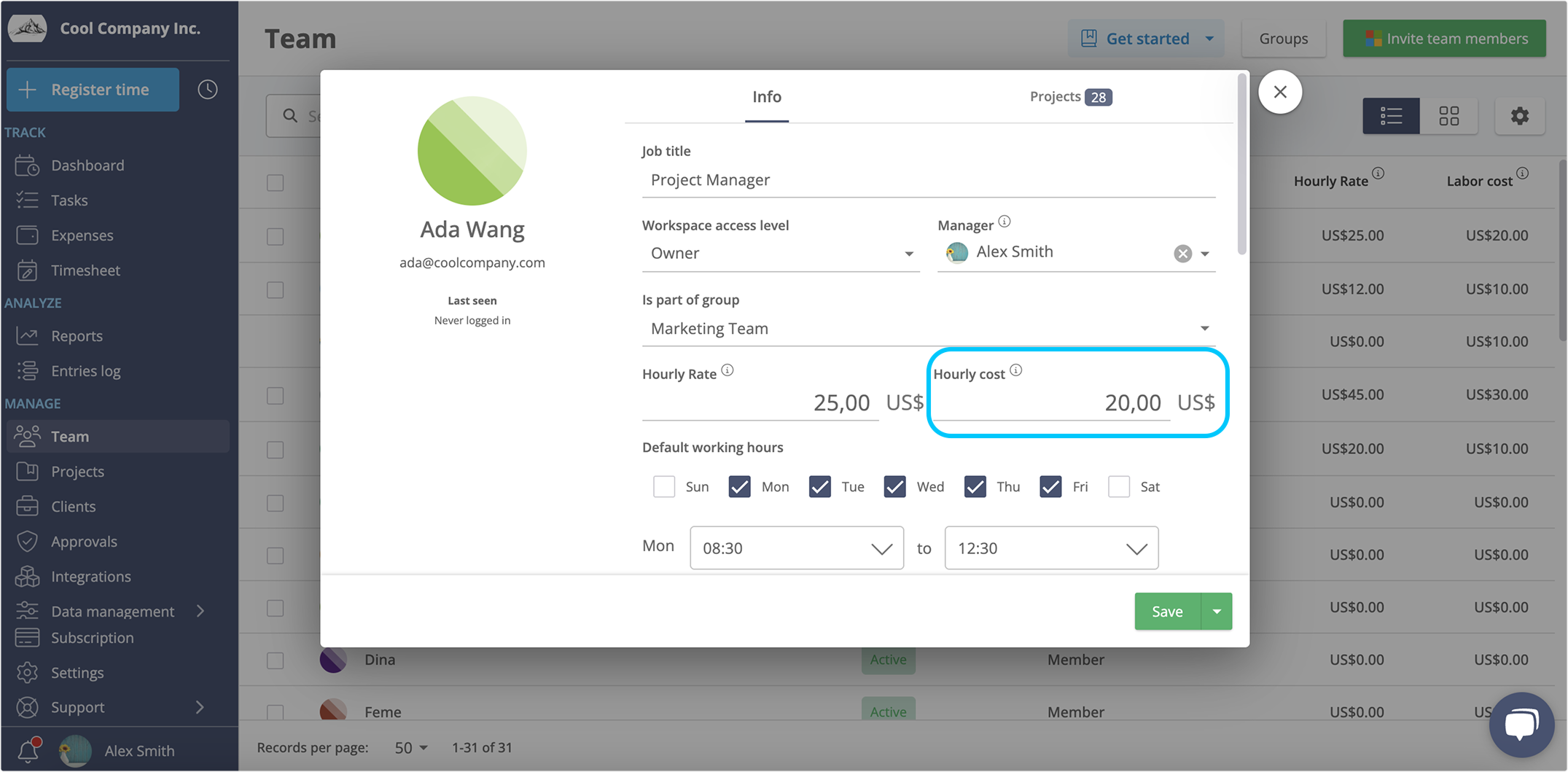
- Expense tracking: Expenses can be logged, uploaded, and linked directly to the relevant project, keeping all cost data in one place.
- Budget management: Both monetary and hourly project budget tracking are available, complete with visual progress bars. Budget alerts can be configured to notify managers when spending reaches a defined percentage of the total budget.
- Billable rate tracking: Hourly billing rates can be set for each user or project, and the platform automatically calculates billable amounts giving managers a clear comparison between costs incurred and revenue generated.
-png.png?width=2136&height=1049&name=billed%20time%20status%202024%20(1)-png.png)
Warning signs that your project cost tracking isn't working
Even with tools in place, project cost tracking can quietly break down. Here are the most common warning signs that your current approach is falling short, and that it may be time to reassess your process.
Red flag #1: You only discover budget overruns after the fact.
If you are finding out that a project has blown its budget at the end of a phase (or worse, at delivery) your tracking process is reactive, not proactive. Effective tracking project costs means having real-time visibility so you can course-correct before the damage is done.
Red flag #2: Your team is not logging time consistently.
Gaps in time entries create gaps in your cost data. If team members log time sporadically or only under pressure, the picture you have of project costs is incomplete and unreliable. Inconsistent logging is often a sign that the time tracking tool is too cumbersome.
If producing an up-to-date cost summary requires pulling data from multiple spreadsheets, chasing updates from team members, or running manual calculations, your project cost management process has a serious efficiency problem. A well-integrated time tracking system should make this a one-click report.
Red flag #4: Your estimates are consistently off. If every new project seems to cost significantly more than planned, historical time and cost data is either not being captured or not being used to inform future estimates. Tracking project costs consistently over time creates a data baseline that makes estimation far more accurate.
Analyzing data for better project profitability
All the data collected on costs, hours, and billing rates can be used to analyze how time is distributed across projects, phases, and individual tasks. This analysis helps managers identify areas where work took longer (or less!) time than expected, uncovering the patterns that most affect project costs.
For instance, if your team logged 40 hours on a phase budgeted for 25, that 15-hour overrun is not just a scheduling issue: it is a direct cost impact.
Multiply that pattern across several phases or projects, and the effect on overall profitability becomes significant. Time tracking data makes these overruns visible early enough to act on them, and help build better estimates for the future.
Managers can also use this data to evaluate project profitability by comparing billable hours against actual effort, logged expenses, and total costs.
Over time, this creates a valuable baseline for more realistic project planning.
Conclusion
Tracking project costs does not have to be complicated.
With the right time tracking tools, a clear integration strategy, and consistent team habits, project managers can move from reactive firefighting to proactive project cost control.
Recognizing the warning signs early, linking time to budget in real time, and using historical data for smarter estimates are the habits that separate consistently profitable project delivery from perpetual budget chaos.
Start tracking project costs today!
Time Tracking for managin project costs FAQ
What is the difference between project cost tracking and project budget tracking
Project cost tracking is the ongoing recording of all project expenses as they occur. Project budget tracking compares those costs against a pre-approved spending limit. The two work together, and time tracking tools support both by linking hours logged directly to cost and budget data in real time.
How does time tracking help with tracking project costs for hourly billing
For teams that bill by the hour, every hour logged is both a cost and a potential source of revenue. When time entries are linked to billable rates, managers can see what a project is costing versus earning, making it easier to catch scope creep early and protect profitability before delivery.
How often should project managers review time tracking and cost data?
A weekly review is sufficient for most projects. For shorter projects or those with tight margins, a daily check may be more appropriate. Modern time tracking tools update cost data in real time, so reviews should never be left until the end of a phase or project.
Ready to streamline time tracking?
Start with a free 14-day trial
- How time tracking helps with tracking project costs
- Common methods for tracking project costs
- Best time tracking Tools with Cost Tracking Features
- Why add time tracking to your project management workflow?
- How to integrate time tracking with project management tools
- Warning signs that your project cost tracking isn't working
- Analyzing data for better project profitability