Time tracking for accurate billing and invoicing  

Time tracking for billing (1)

Introduction

Those who trade in time (agencies, consultants, lawyers) cannot afford to lose time.

Literally: billable hours tracking is crucial for ensuring their work is accurately invoiced and rewarded.

In this guide, we’ll cover everything professionals need to know about tracking time for billing and invoicing: what to track, the best software to use, and how to track hours to create accurate invoices.

The best ways to track billable hours

Professionals can use several methods for work time tracking, depending on their workflow setup and their teams’ needs. Common methods include:

  • Spreadsheets: Easy to set up and cost-effective, most companies and employees are familiar with filling out spreadsheets. While this method is straightforward and inexpensive, it is prone to errors and can be time-consuming. However, it can still be beneficial for small businesses or freelancers who have simple tracking needs and prefer a low-tech solution.
  • Time tracking software: As companies scale, dedicated time tracking software becomes a more accurate and efficient solution. It also offers additional features such as lightweight project management, team productivity insights, billable totals, and reporting, making it a solution for businesses of any size.
  • Automatic time tracking: This option significantly reduces manual input by recording time while users work, allowing them to focus on tasks instead of starting and stopping timers. Some tools also use GPS location tracking, which is particularly useful for companies with distributed teams or employees working off-site.

Each method has its pros and cons. Overall, time tracking software tends to provide the most complete and flexible solution for billing purposes. It supports teams of all sizes (from small teams to larger organizations), goes beyond simple time tracking (with project, client, and team management features), and provides leaders with dashboards and reports to monitor progress and profitability.

Best time tracking software for billing and invoicing

Time tracking software comes in many different options designed for different needs. Companies can choose the one that best fits their workflows, industry requirements, and compliance needs.

  • Timeneye: Billable hours tracking, budget tracking, and project management with seamless integration with the Microsoft Suite
  • Toggl Track: Manual and automatic tracking with a user-friendly and frictionless deployment, plus customisable reports
  • Everhour: Billable time and timesheet software with wide and strong offer of native integrations
  • Productive.io: Agency-focused software for billable tracking and financial forecasting
  • Harvest: billable hour tracking with built-in invoicing features and forecasts

Want to get started with Time Tracking?

Discover Timeneye's effortless time tracking, right in the Microsoft Suite

LEARN MORE


A guide to accurate tracking of billable hours: best practices

Step 1: Choose the right time tracking tool

As explained above, companies should choose the time tracking tool that best fits their needs. Before making a decision, consider several factors:

  • Do you need task-level tracking, or is project-level tracking enough?
  • Do you manage project budgets and need to track their progress?
  • Do you need to mark entries as billable, billed, or non-billable?
  • Does the software need to integrate with other tools?
  • Can data and reports be exported in multiple formats?

For the purpose of this guide, we’ll use screenshots from Timeneye as an example.

Step 2: Set up the tracking structure

When time is tracked accurately, you reduce the risk of hours being assigned incorrectly. Make sure each project is set up with its phases, and create tasks within those phases.

This ensures that the team has the correct structure in place to assign their hours accurately.
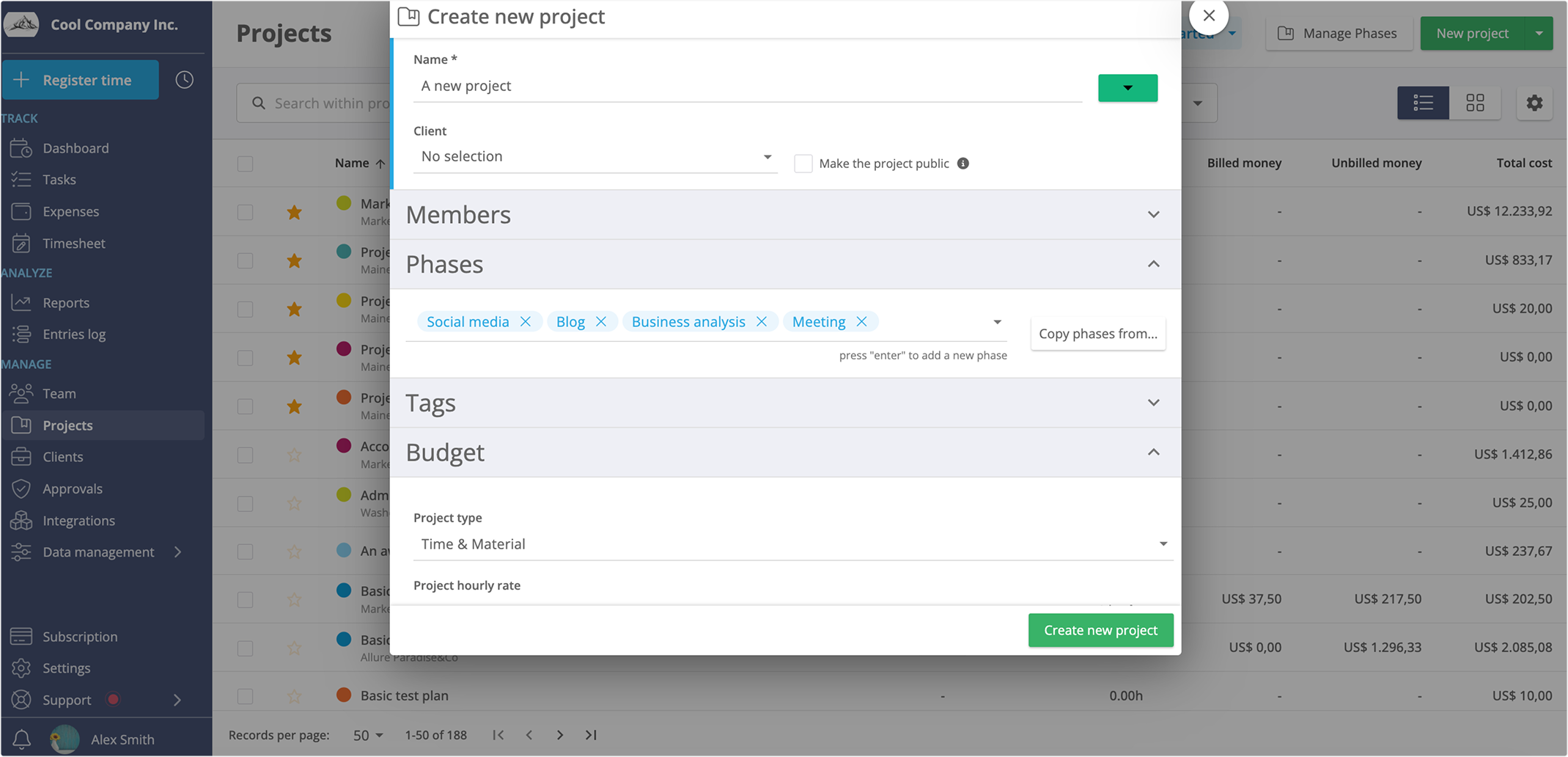
project phases

Step 3: Set hourly rates and costs

In the screenshots below, you can see an example of a project in Timeneye where an hourly rate is set for each team member. You can also set hourly costs to help leaders track profitability, not just billable totals.
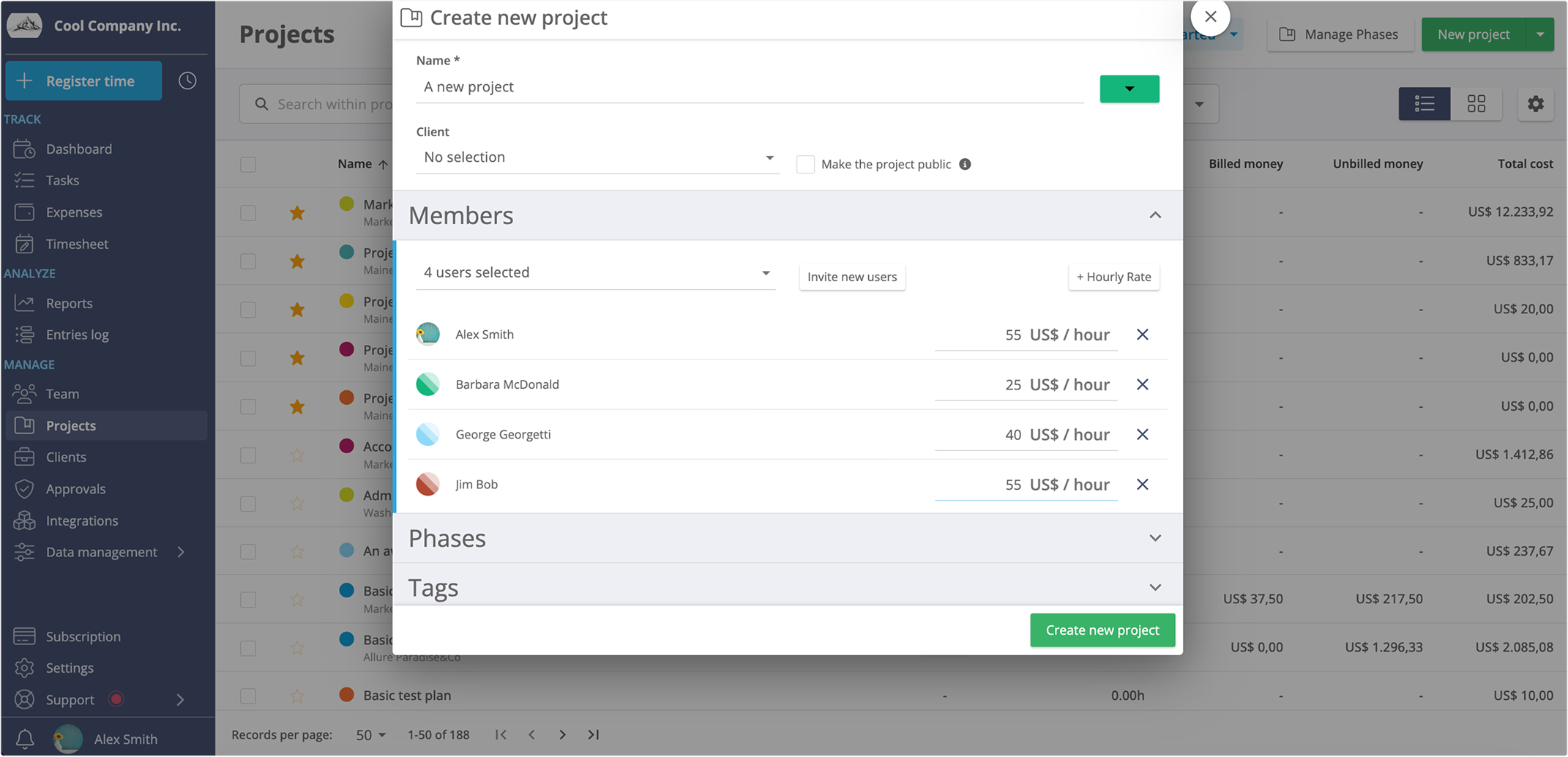
set hourly rates

Most time tracking software allows you to:

  • Set hourly rates for entire projects
  • Assign rates to individual users
  • Define internal hourly costs for profitability tracking

Step 4: Ensure the team tracks time consistently

For most teams, the challenge isn’t tracking time: it’s tracking it consistently.

When time entries are missed or recorded incorrectly, it inevitably leads to inaccurate totals, incorrect invoices, and extra work for the finance team.

To ensure consistent tracking:

  • Enable notification reminders for time entries
  • Activate integrations with tools your team already uses (calendar, task management tools, or project management software)
  • Encourage teams to track time daily rather than backfilling timesheets weekly or monthly

Step 5: Export billable entries and totals

When it’s time to bill your client, export the tracked time for the relevant projects.

Before exporting:

  1. Verify that all hours are recorded and up to date
  2. Mark any activities that should not be billed as non-billable
  3. Generate an itemized list of time entries showing tasks completed, project phases covered, and total billable hours
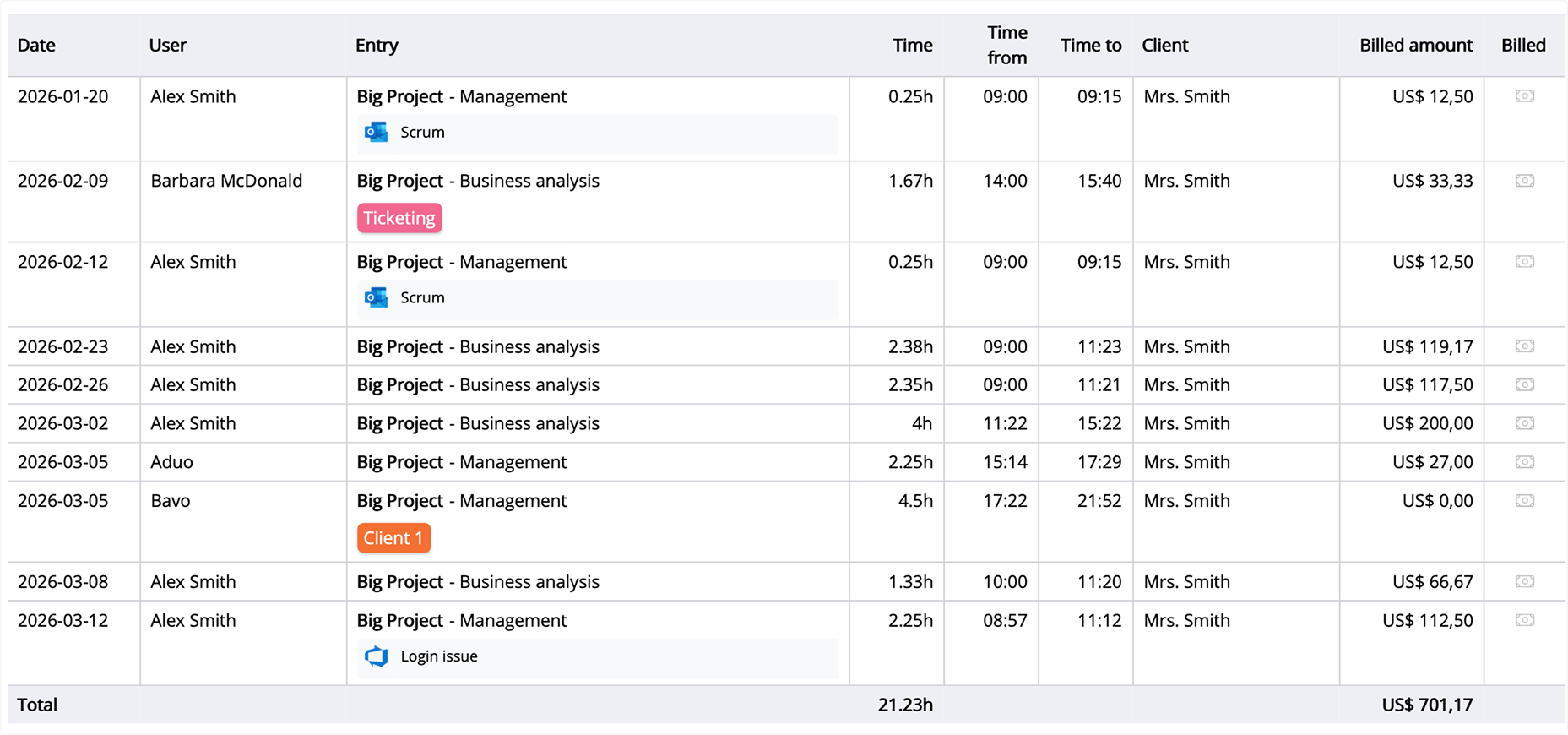
itemized list

This ensures your invoice is clear, transparent, and accurate.

Step 6: Create your invoices

You can import the time tracking data into your invoicing system or connect the two tools through an API or integration.

From there, you can generate the invoice directly in your invoicing platform. Alternatively, you can use your own invoice templates or templates available online.

Step 7: Mark entries as billed

Once the billing process is complete, mark the relevant entries as billed to ensure your records stay accurate and up to date.

This step prevents duplicate billing and helps maintain a clear financial overview.
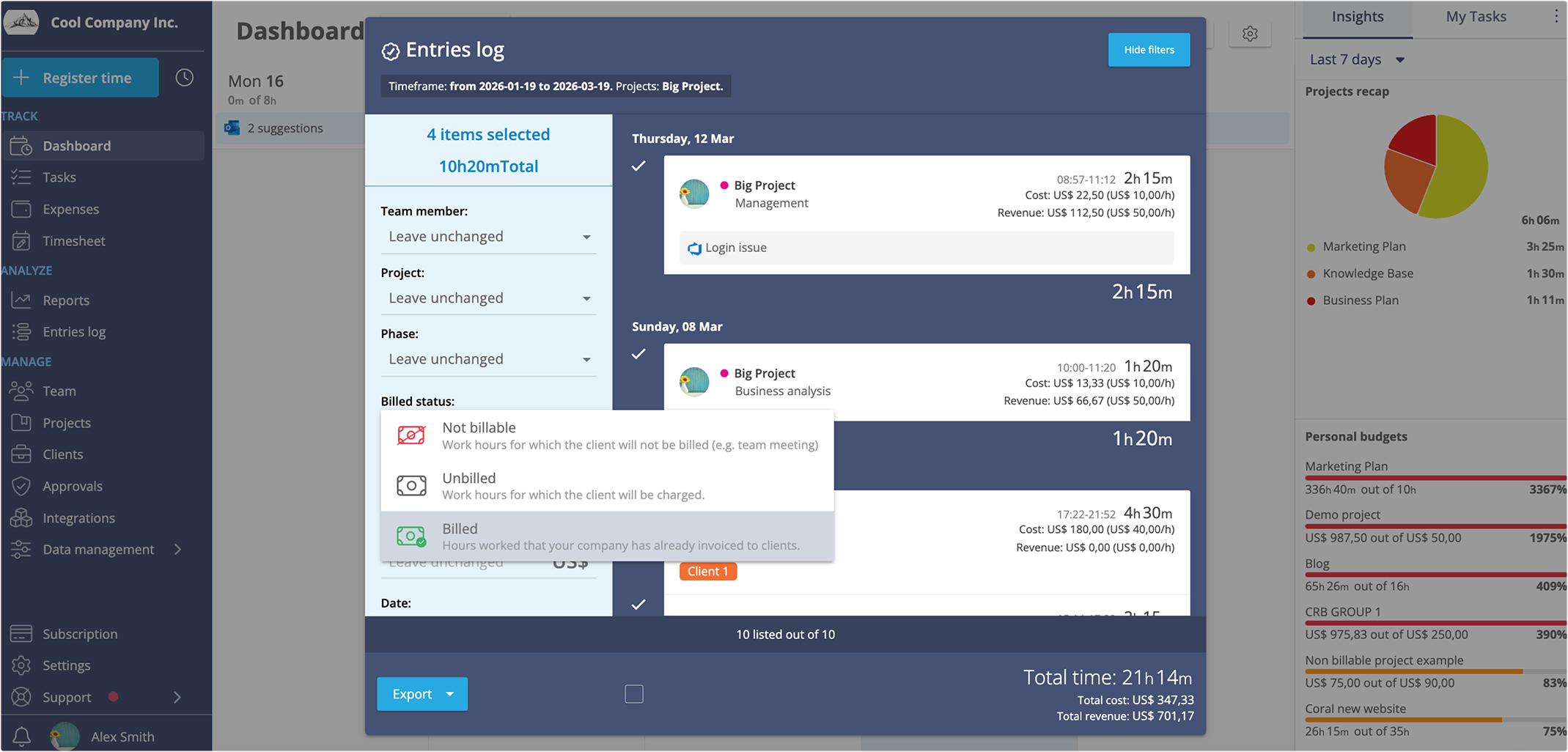
mark as billed

Common mistakes to avoid when tracking billable time

  • Not clearly defining what counts as billable vs. non-billable time
  • Guessing or estimating time entries
  • Not providing clear guidelines or training for consistent time tracking
  • Tracking time inconsistently (or not tracking it at all)
  • Not counting activities like meeting with clients in the billable activities (unless your contracts say otherwise)

Analysing productivity and profitability

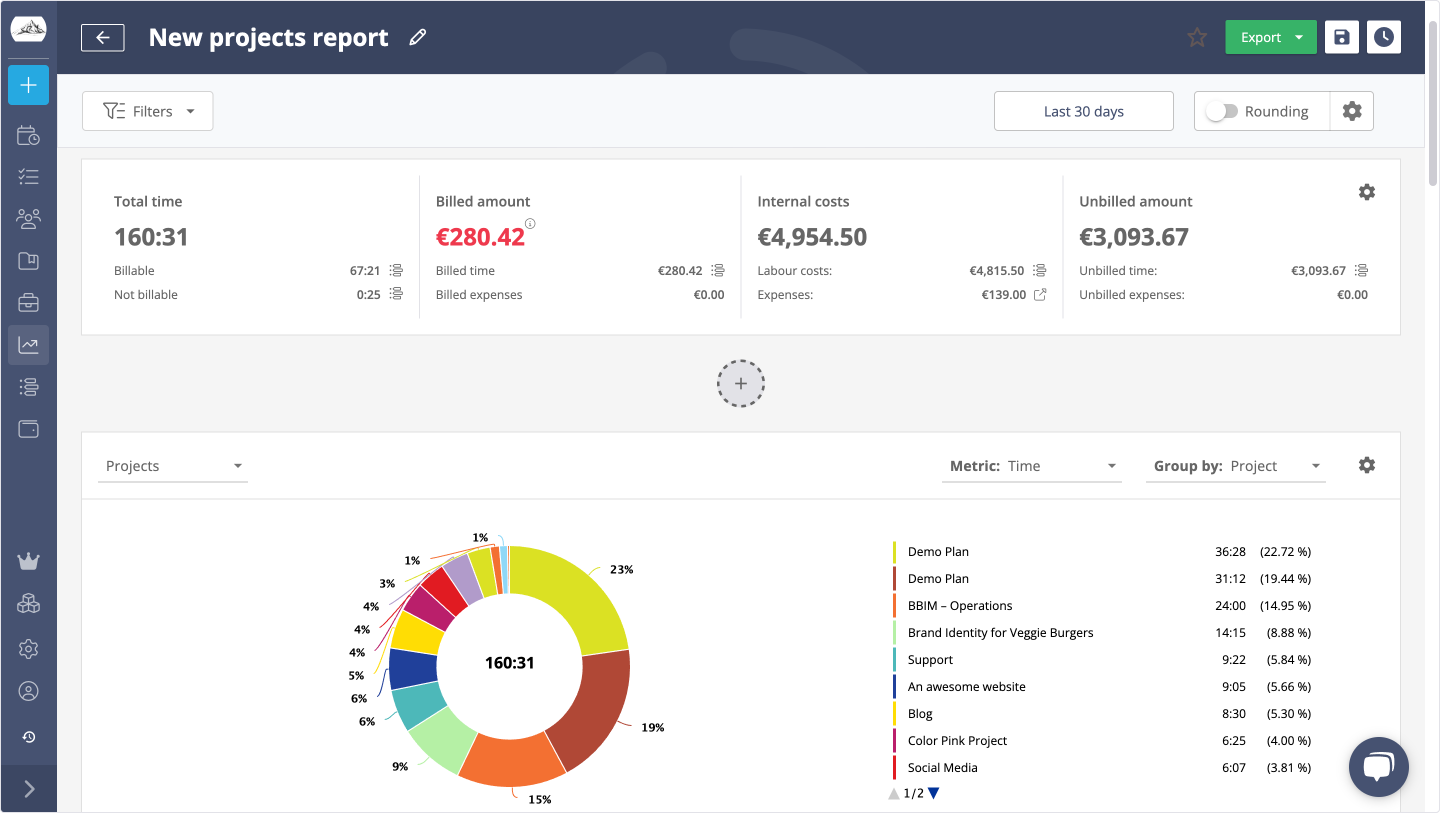
One of the biggest advantages of time tracking software is that the data collected can be used for far more than billing and invoicing.

Most importantly, it can help unlock valuable productivity and profitability insights.

For example:

  • An agency can identify which projects require the most effort and determine whether the revenue generated justifies that work.
  • A consulting team can analyze how much time is spent on billable vs. non-billable work and adjust accordingly.
  • The finance team can track labor costs against revenue to better understand margins.
  • Business leaders can identify their most profitable clients and focus their efforts accordingly.

All of this helps companies that bill by the hour find the right balance between labor, revenue, and profitability.
Report


Conclusion

Ultimately, time tracking is not just an administrative task. It’s a vital tool that helps agencies, lawyers, and consultants make sure their work is fairly rewarded.  When used correctly, the insights gained from time data can turn into a powerful advantage for both project success and profitability

To see how time tracking can work for your team, explore our website and discover all the ways you can use Timeneye for efficient billable hour tracking and invoicing.


Time Tracking For billing and invoicing FAQ

How can you track billable hours?

There are several ways to track billable hours, depending on a company’s size and needs:

  • Spreadsheets Simple to set up and easy to use with little training required. However, they are prone to manual errors and do not scale well as teams grow.
  • Time tracking software A more advanced solution that combines time tracking with project management, budget monitoring, and reporting features.
  • Automatic time tracking tools These tools reduce or eliminate manual input and may include features like GPS tracking, making them especially useful for remote or field teams.

Accurate project time tracking helps teams stay aligned with deadlines and provides reliable data for reporting and future planning.

What is time tracking?

Time tracking is the process of recording the amount of time spent on projects, tasks, or phases of work.

For billable work, hourly rates can be assigned to projects. The system then automatically calculates totals based on the tracked time.

Key benefits include:

  • Understanding how time is distributed across projects and tasks
  • Visibility into team capacity and workload
  • Helping teams deliver projects on time and within budget
  • Providing reliable data for future estimates and planning

What is the time tracking process?

A typical time tracking process involves:

  1. Tool integration The time tracking system is connected with other tools the team uses (e.g., project management or collaboration tools).
  2. Project setup Managers create projects, define phases and tasks, and assign team members.
  3. Time tracking Team members log the time they spend on assigned tasks.
  4. Billing and reporting For billable projects, managers can export detailed reports of tracked hours and mark them as billable or non-billable.