.png)
Why accurate billable hour tracking matters
When a business relies on hourly services, tracking time is more than important: it’s the foundation for keeping the business healthy and profitable. Consultants often work on multiple projects across a wide portfolio of clients, as well as multiple consultant experts with different hourly rates. Meanwhile, freelancers work hard to build their client base, actively searching for and pursuing each new opportunity, and building their business on trust and reliability.
With accurate billable hour tracking, businesses can:
- Ensure project profitability by tracking the actual work completed and making sure no activities go unaccounted for. When every billable activity is tracked and assigned to projects, it makes knowing what’s complete so much easier. And, as we’ll learn in this guide, accurate tracking also leads to accurate, fairer invoices.
- Support transparent and positive client relationships: sometimes it’s hard for clients to understand what has been completed, unless they request daily updates. They can benefit of a clear and transparent way of showing, both to leadership and clients, what work was completed and when, which builds trust.
- Improve client billing accuracy. No client likes to be overcharged, and no business can afford to undercharge. Accurate time tracking = accurate billing and invoices, leading businesses to profitability and healthy client relationships.
Billable vs. Non-Billable hours: what you need to know
There is often confusion around what constitutes billable and non-billable work. Not every activity should be billed to the client, and sometimes it’s not easy to decide what should be included in the invoice. While the final decision depends on the contract terms and your client relationship, generally these are what is considered billable VS non billable activites:
- Billable work: the actual project work, project-related meetings, project planning, research and analysis within the project scope, client-requested edits and adjustments, and project-related emails.
- Non-billable work: networking events, administrative tasks such as invoicing and payment processing, pitching to new clients, training outside the project scope, and meetings or emails before the contract is signed.
Once businesses have a clear idea of what work follows in each category, they find ways to balance billable and non-billable work to stay profitable.
Common time tracking challenges for consultants
At this point, any consultant reading this might be thinking: “Yes, I know I need to track time, but it’s hard to stick to the habit!”
Don’t worry: that’s completely understandable. Many teams resist time tracking due to concerns about privacy or surveillance. And even in transparent environments, consultancy teams can face several challenges when tracking billable hours:
- Multiple consultants may work simultaneously on the same project, with different hourly rates depending on seniority or client agreements. This can make calculating billable totals more complex.
- Consulting firms frequently manage multiple projects and clients simultaneously. In the hustle and bustle of daily commitments, it’s easy to forget to record tasks accurately, or even at all. This can lead to incomplete or incorrect timesheets, potentially snowballing into issues with invoices and calculations.
- Consultants, like many professionals, may resist time tracking due to privacy concerns, fear of micromanagement, or disruptions to their workflow.
Common time tracking challenges for freelancers
A common time tracking myth is that time tracking only benefits large companies. In reality, it’s just as valuable for freelancers and self-employed professionals. While freelancers may embrace tracking their billable hours, they can still face challenges:
- Freelancers often self-manage everything: project work, administration, emails, research, networking, and even office upkeep. Time tracking can feel like just another task on top an already long list, leading to it being treated as an afterthought, resulting in inaccurate entries.
- Because freelancers need to work hard to build and maintain their clients, they may feel pressured to underbill or underreport activities and not charge them to the clients. Last-minute edits, additional meetings, and out-of-scope requests may seem reasonable in the moment to keep a client happy. Over time, however, these unpaid hours accumulate and impact profitability.
- Speaking of profitability: tracking hours for invoicing is one thing; analyzing that data for productivity insights is another. While many tools offer reporting features or integrations with tools like Power BI, finding the time to analyze trends, bottlenecks, and productivity patterns can be challenging.
Best practices to track billable hours accurately
Whether you’re a consultant, freelancer, lawyer, or any other professional who bills by the hour, you can follow this guide to billable work time tracking, so every hour is properly accounted for!
Step #1: choose the right time tracking system
To track billable hours effectively, you need the right tools. A spreadsheet can work initially, but it is prone to errors and difficult to scale as teams grow and project portfolios become more complex. There are many time tracking software options designed specifically for managing billable hours, so choosing the best solution will depend on your business needs and workflow. (If you don’t know where to start, there’s a list of the most popular time tracking tools for billing purposes at the end of this guide)
Step #2: define your billable vs. non-billable activities
To make sure you don’t overcharge or undercharge your client, it’s crucial to have clarity on what constitutes a billable or a non billable activites. Use the recap in this guide as a starting point, but always align your definitions with the project scope and contract terms. There's a chance you'll need to adjust if the work and the contracy changes: the key is clarity and transparency.
Step #3: categorize time entries accurately
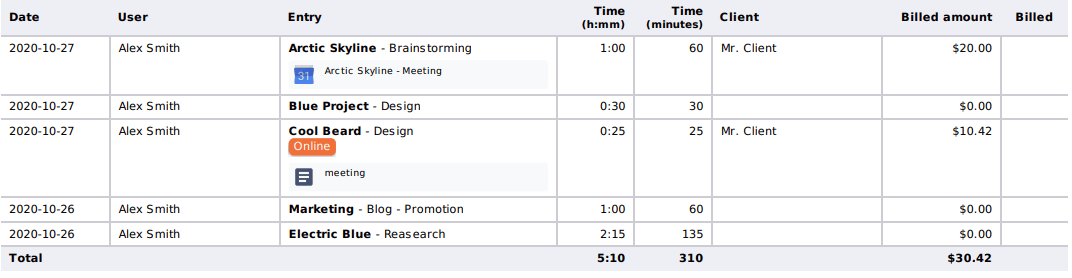
Simply logging hours alone is not enough: time entries must be assigned to the correct project, phase, client, and task. Accurate timesheets mean accurate billable totals and invoices, and will provide the most precise view of how and where time was allocated, where bottlenecks appear, and where the areas of improvement are.
For example: here’s a time entry that’s been correctly assigned to a project, project, phase, date with even a tag (cross-project categorization) for greater clarity:

Step #4: Minimize manual work with integrations and automation
Reducing manual work is not just practical: it’s an effective productivity strategy to optimize time, survive the busiest of days, and generally build an effective workflow. Many time tracking tools offer integrations to fit with everyone’s workflow. For example, if you use a digital calendar or project management tool, you could start and stop timers directly from these platforms, or automatically import entities (events, calls, projects, tasks), making it easier to log your time without interruptions. In addition, automation features can generate reports, reducing manual work.
Step #5: build a daily tracking habit
Integrating time tracking into a daily routine is hard enough, but without consistency, even the best setup falls flat.
Track your time daily: waiting until the end of the week increases the risk of forgotten details and inaccuracies, leading you to wonder “What exactly did I work on yesterday?” Log time as you go, either by running a timer or entering it immediately after completing a task. Then, se reminders or notifications: most tools offer the option to set an alert, so you don’t forget to complete your time tracking task.
Time tracking for client billing and invoicing
Now for the most important part: getting paid for your work. Accurate time tracking is crucial for client billing and invoicing: it ensures fair compensation and provides transparency to clients.
When it’s time for invoicing, start by:
- Verifying billable totals
- Removing non-billable entries where necessary
- Ensuring entries are rounded according to industry standards (if applicable)
Then, transfer the data to your invoicing system (via integration, API, or manual export). This level of detail not only justifies your fees but also builds trust with your clients. Make sure your invoices are easy to read and include details like dates, descriptions, and total amount due.