.png)
What exactly is work time tracking?
Work time tracking is the systematic process of recording how time is spent on tasks, projects, and activities in order to understand, manage, and improve the way work gets done. It provides visibility into daily workflows, showing where effort is going, what’s taking longer than expected, and where bottlenecks or wasted time may be happening. When used well, time tracking isn’t about supervision or squeezing more hours out of people – it’s about giving teams and organizations the data they need to plan realistically, balance workloads, estimate projects more accurately, and make informed decisions that improve productivity, profitability, and employee well-being.
Time tracking matters because time is the foundation of all work, yet people routinely underestimate how long tasks take or where their hours actually go. Without a clear picture, planning becomes guesswork and teams end up stretched, rushed, or misaligned. When you start tracking time, several things happen:
- Hidden work becomes visible , like the small tasks, interruptions, and context-switching that quietly consume large portions of the day.
- Actual workflow patterns emerge, showing where tasks slow down, where handoffs are clunky, and where effort is being duplicated.
- Estimates become grounded in reality, informed by past data rather than optimistic assumptions.
- Workload imbalances are easier to spot, allowing teams to redistribute tasks before stress or burnout takes root.
- The link between effort and results becomes clearer, helping teams identify which activities truly drive value.
With this visibility, teams can plan more realistically, prioritize more intelligently, and work with greater confidence. The outcome isn’t more control–it’s smarter, healthier, more sustainable work. But before time tracking became a strategic business tool, it was a clunky, mechanical necessity. The evolution tells us a lot about how work itself has changed.
A short history of time tracking in the workplace
The journey from stamped paper cards to cloud-based systems is a story of workplaces getting smarter about how time is valued, but our modern idea of time tracking has surprisingly old roots. The story begins in 1888, when Willard LeGrand Bundy invented the first mechanical time clock. Workers would slide a paper card into a wall-mounted device to mark their arrival and departure times. At this stage, time tracking wasn’t about productivity or efficiency. It was simply a way to ensure fairness in pay and standardize the workday.

Early time clock, made by National Time Recorder Co. Ltd. of Blackfriars, London at Wookey Hole Caves museum (Source)

As work moved into offices, time tracking adapted. Paper timesheets became common for knowledge work. They were flexible but relied heavily on memory and approximation. Many entries were filled in at the end of the day or even the end of the week, meaning accuracy was often inconsistent and a great deal of effort went unrecorded.
The introduction of computerized spreadsheets in the late 1970s and 1980s helped automate calculations and reduce basic errors. However, even with digital formatting, most time entries were still based on best guesses. Still, the underlying challenge remained: we didn’t have a reliable way to capture how time was actually being spent.
In the 1990s and early 2000s, workplaces adopted electronic time clocks and desktop software. Swipe cards, PIN systems and early biometric scanners helped reduce time theft and improved precision. But these systems were usually isolated to a single location and disconnected from other business tools. The data stayed where it was entered.
A turning point came in the mid-2000s, when cloud-based time tracking emerged. People could log time from anywhere: at the office, at home, on-site or while traveling. Just as importantly, time data could now flow into payroll, budgeting, invoicing and project planning systems, making time tracking part of broader business operations rather than a standalone task.
This shift fundamentally changed the purpose of time tracking. What had once been a record of attendance became a way to understand how work actually happens. Teams could see how long tasks truly took, where projects slowed down and where workloads were uneven.
Today, time tracking is less about proving that work happened and more about planning realistically, balancing workloads, supporting healthier productivity, and communicating expectations clearly.
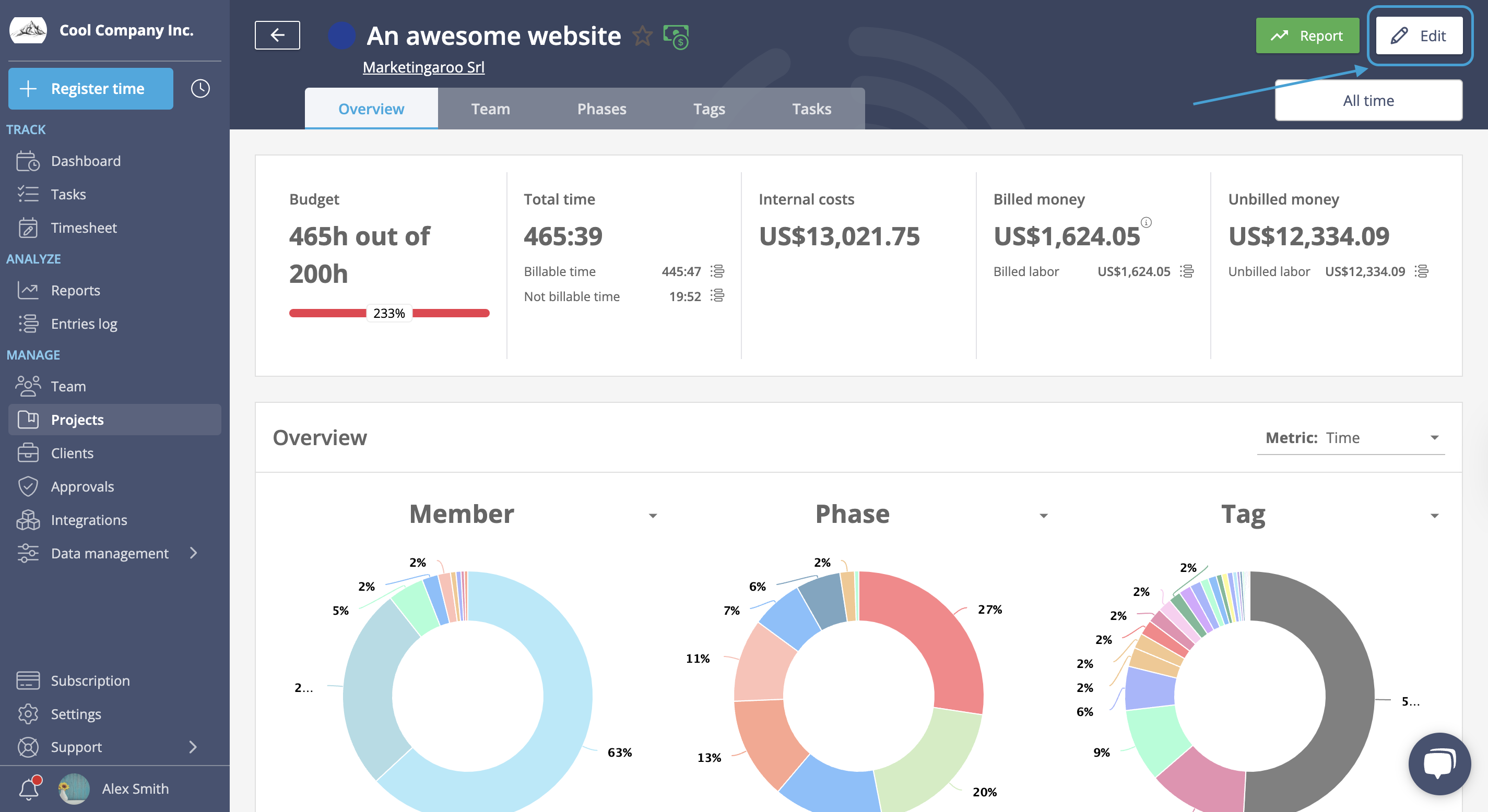
A time and project view in Lucen Track Time Tracking
The truth behind the most common time tracking myths
Much of the resistance to time tracking stems from outdated perceptions rather than current reality. Here are six common myths that make teams hesitant to adopt time tracking - and why they don't hold up. We'll explore these challenges and solutions in more detail throughout the following sections, providing practical strategies for successful implementation.
Myth 1: "It's just micromanagement in disguise"
- Reality: Modern time tracking is about transparency and improvement, not surveillance. It helps teams identify process improvements, balance workloads, and remove roadblocks, not police every second.
Myth 2: "It's too complicated and adds more work"
- Reality: Today's tools are user-friendly with one-click timers and automation. They save time by eliminating manual record-keeping. Invest seconds daily, save hours weekly on admin work.
Myth 3: "It's expensive and only for large companies"
- Reality: Affordable, scalable options exist for all business sizes. Time tracking typically pays for itself through accurate billing, fewer payroll errors, and reduced overhead.
Myth 4: "Employees will hate it and morale will suffer"
- Reality: Poor communication damages morale, not tracking itself. When introduced with transparency and clear benefits, tracking can actually improve morale by protecting employees, ensuring recognition, and building trust.
Myth 5: "It only helps management"
- Reality: Employees gain insights into their own work habits, can identify areas for improvement, and have data to support workload discussions and performance reviews. It's your data too.
Myth 6: "I'll spend more time tracking than working"
- Reality: Modern tools require just a few clicks, maybe 30 seconds. They replace hours of manual reporting and eliminate the headache of trying to remember what you did last week.
Data-driven insights empower both employees and managers
One of the greatest advantages of work time tracking is the treasure trove of data it creates - data that empowers everyone in an organization when used wisely. Rather than gut feelings or rough guesswork, managers and employees can rely on hard numbers to improve the way they handle tasks.
For employees, time tracking provides:
- Self-awareness of productivity patterns: Time data can reveal that a developer's most focused coding time is in the morning, or that a marketer spends 10% of the day on unplanned tasks. Many people aren't fully aware of how they spend their workday until they see it tracked
- Concrete evidence for self-improvement: When you see time-wasters quantified on a chart, it becomes impossible to ignore them
- Personal ownership: People can take charge of improving their workflow and track progress, like reducing time spent in unnecessary meetings week over week
- Data for self-advocacy: If you feel overworked, you can point to the data to discuss workload adjustments or highlight contributions during performance reviews
For managers and team leaders, time tracking data provides:
- Visibility into team performance: Managers can see how long projects actually take, which tasks consume the most hours, and how each team member contributes
- Better resource allocation: Time data helps identify underutilized or overburdened team members, allowing managers to balance workloads and prevent burnout
- Proactive problem-solving: If a task is taking longer than anticipated, managers can add resources or extend deadlines before a crisis hits
- Constructive feedback grounded in facts: Instead of vague critiques, managers can use objective data to point to specific metrics and collaborate on solutions, making performance evaluations more fair and useful
The clarity from time tracking builds trust on both sides. Employees feel assured that good work is visible to management (even if done remotely), and managers can make confident decisions about hiring, budgeting, and deadlines with accurate information. Research indicates that companies using modern time tracking solutions report 25-40% boosts in productivity, more accurate client billing, and better employee morale due to fair and transparent tracking practices. Case studies show companies implementing cloud-based time tracking have seen 25% increases in productivity within six months.
But here's the bigger payoff: all that time data compounds to something powerful.
The patterns show which projects earn their keep, where processes break down, and whether changes deliver results. Real-time visibility turns improvement from guesswork into evidence.
How to track time: methods of time tracking
Time tracking comes in many flavors, from paper timesheets your grandparents would recognize to AI-powered apps that run in the background. Over the decades, businesses have experimented with everything from punch cards to cloud-based software, and each approach has its own strengths and trade-offs. If you understand the different methods available, you can choose one that actually works for your team - not just what sounds good in theory.
Manual time tracking: is it still relevant?
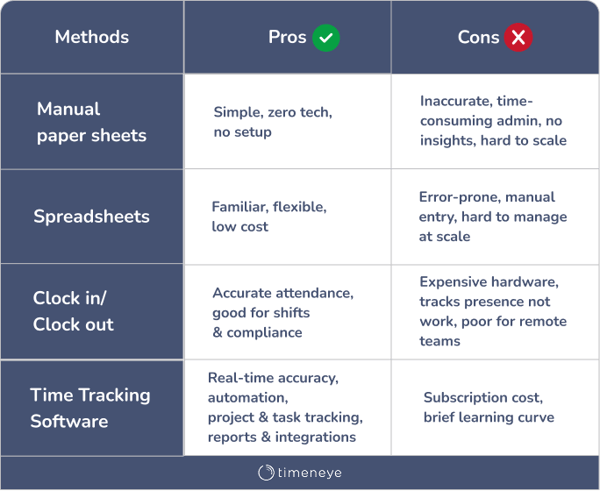
Manual time tracking is exactly what it sounds like - people recording their hours by hand, whether on paper timesheets or in spreadsheets. It's been around forever, and plenty of businesses still use it today.
Paper timesheets are the classic approach. Employees fill out weekly (or daily) sheets with their name, hours worked, and maybe a few notes about what they did. A supervisor reviews and signs off, and the data gets manually entered into payroll. The beauty of paper timesheets is their simplicity - zero learning curve, no software to install, and they work everywhere.
But that simplicity comes at a cost. Paper timesheets are notorious for inaccuracy since they rely on memory and estimation rather than real-time tracking. They also create hidden costs in printing, storage, and the administrative time needed to process them. And when you need to analyze productivity or track project budgets? Good luck pulling meaningful insights from stacks of paper.
Spreadsheets like Excel or Google Sheets are the digital evolution of paper timesheets. They're familiar, flexible, and already part of most companies' toolkit. You can customize them however you want, add formulas for calculations, and share them across the team. The problem is that spreadsheets weren't designed for time tracking - they're essentially general-purpose tools pigeonholed into a specific role. One misplaced decimal or accidental delete can cascade across multiple rows, corrupting your data.
As your team grows and projects multiply, managing dozens of timesheets in spreadsheet form becomes a nightmare. And while spreadsheets can store data, they don't offer the automated reporting, integrations, or project management features that modern businesses need.
So is manual time tracking still relevant? In some scenarios, yes. If you're a very small team with straightforward needs, or if you're in an industry where digital tools aren't practical, manual methods can work. But for most businesses today, manual tracking creates more problems than it solves.
Timesheets vs. digital tracking: Which is better?
The debate between traditional timesheets and digital time tracking software essentially boils down to this: do you want simplicity or accuracy? Convenience or insights?
Traditional timesheets - whether paper or spreadsheet-based - are straightforward and require minimal setup. Everyone knows how to fill out a form. There's no subscription fee, no training sessions, and no concerns about data privacy with third-party software. For small teams or simple tracking needs, that can be enough.
But here's where digital tracking pulls ahead: accuracy and automation. Digital time tracking software is purpose-built for one thing - capturing time data reliably and making it useful. Instead of asking employees to remember and estimate their hours at the end of the week, digital tools let them log time as it happens with a simple click or tap. Some tools even track time automatically in the background, eliminating manual entry altogether. The result? Data you can actually trust.
Digital tracking also offers real-time visibility. Managers don't have to wait until Friday afternoon to see who's working on what. They can check project status, identify bottlenecks, and adjust resources on the fly. And when it's time to run payroll, generate invoices, or analyze productivity, digital tools do the heavy lifting - exporting reports, calculating totals, and integrating with other systems automatically.
There are trade-offs, of course. Digital tools typically come with a subscription cost (though many offer free tiers for small teams), and there's an initial learning curve for setup and adoption. If your subscription lapses, you might lose access to your data unless you've exported it. But for most businesses, these downsides are minor compared to the time saved and the insights gained.
The verdict? If you're tracking a handful of people doing straightforward work, traditional timesheets might suffice. But if you care about accuracy, need detailed project insights, or want to save your team from administrative drudgery, digital tracking is the clear winner.
Clock-in systems and biometric tracking: When do they make sense?
Some businesses need more than just timesheets - they need to know exactly when employees arrive and leave. That's where clock-in systems come in.
Physical clock-in systems use hardware installed at entry points, allowing employees to log their presence with swipe cards, PIN codes, or biometric methods like fingerprint or facial recognition. These systems are common in industries with high security or strict compliance requirements - think manufacturing plants, healthcare facilities, or warehouses where knowing who's on-site and when is critical.
The big advantage here is reliable attendance tracking. Unlike self-reported timesheets where someone might fudge their arrival time, a clock-in system creates an objective record. It's also useful for managing shift work and ensuring adequate staffing levels. If you're running a 24/7 operation or managing a large hourly workforce, these systems provide structure and accountability.
But clock-in systems have limitations. For one, they're expensive to install and maintain - you're paying for hardware, setup, and ongoing technical support. They also only tell you about attendance, not productivity. Knowing someone clocked in at 9 AM doesn't tell you what they actually accomplished that day. And biometric systems in particular can raise privacy concerns among employees who aren't comfortable scanning their fingerprints or faces for work.
When do clock-in systems make sense? They're valuable when physical presence matters - when you need to ensure security, track shifts, or meet regulatory requirements for attendance records. But if your team works remotely, or if you care more about output than hours in the building, traditional clock-in systems aren't going to give you the insights you need. For those scenarios, digital time tracking software that focuses on tasks and projects makes a lot more sense.
Digital time tracking software: The modern standard
If manual timesheets are the bicycle and clock-in systems are the bus, digital time tracking software is the sports car - faster, smarter, and built for performance.
Time tracking software is purpose-built to do one thing exceptionally well: capture, organize, and analyze how time is spent. Unlike spreadsheets that serve a million different purposes, these tools are designed specifically for tracking work hours, managing projects, and generating insights. They come in desktop apps, web interfaces, mobile versions, and browser extensions, giving your team flexibility to log time from anywhere.
Here's what sets digital tracking apart:
- Automated time capture: Many tools can track time in the background, detecting which apps you're using or which projects you're working on without any manual input. Others offer one-click timers that start and stop with a single tap.
- Cloud-based access: All your data lives in the cloud, accessible from anywhere. Remote teams, field workers, and office staff can all log time seamlessly, regardless of location.
- Real-time reporting: Instead of waiting days or weeks to compile time data, you get instant reports showing who's working on what, where budgets stand, and which projects are running over.
- Integrations: Modern time tracking tools connect with project management platforms, payroll systems, invoicing software, and more. Your time data flows automatically to where it's needed, eliminating double-entry and reducing errors.
- Project and task tracking: You're not just tracking hours - you're tracking hours spent on specific projects, tasks, and clients. That granularity lets you analyze profitability, identify inefficiencies, and make data-driven decisions.
The main downsides? There's usually a subscription cost (though many tools offer free plans for small teams), and there's an initial setup and onboarding process. Some employees might need a bit of training to get comfortable with the tool. But once you're up and running, the time saved in administrative work and the quality of insights you gain make it worthwhile.
Popular options in this space include tools like Lucen Track, Clockify, Harvest, and Jibble, each catering to different needs and team sizes. The key is finding one that fits your workflow and integrates with the tools you're already using.
Traditional vs. digital: Which one is better?
Let's cut to the chase: for most modern businesses, digital time tracking is the better choice. But "better" depends on what you're optimizing for.
Traditional methods (paper timesheets, spreadsheets, clock-in cards) win on simplicity and low upfront cost. If you're a small team doing straightforward work with minimal project complexity, and you don't need detailed analytics, a spreadsheet might be all you need. Traditional methods also work in environments where digital tools aren't practical - construction sites without Wi-Fi, for example, or industries where employees don't have regular access to computers or smartphones.
But traditional methods fall short when it comes to accuracy, scalability, and insights. Manual time tracking relies on memory and estimates, which are notoriously unreliable. It's labor-intensive to compile and analyze, and as your team or project complexity grows, manual methods quickly become unmanageable. You also miss out on real-time visibility - by the time you've collected and processed everyone's timesheets, the data is already outdated.
Digital tracking, on the other hand, is built for the realities of modern work. It's accurate because it captures time as it happens. It scales effortlessly as your team grows. It provides real-time insights so you can make decisions today, not next week. And it automates the busywork - no more manually tallying hours or chasing down missing timesheets.
The trade-off is cost and complexity. Digital tools require a subscription (though often affordable), and there's a learning curve for adoption. But for most teams, the ROI is clear: you save time on administration, reduce errors in payroll and billing, and gain visibility into how work is actually getting done.
The bottom line? If you're still using traditional methods, you're probably doing it because "that's how we've always done it" rather than because it's actually the best option. Digital tracking isn't perfect, but for the vast majority of businesses today, it's the smarter choice.
Tracking tasks vs. tracking projects: What's the difference?
When you're setting up time tracking, one of the first decisions you'll face is whether to track at the task level or the project level. The difference matters more than you might think.
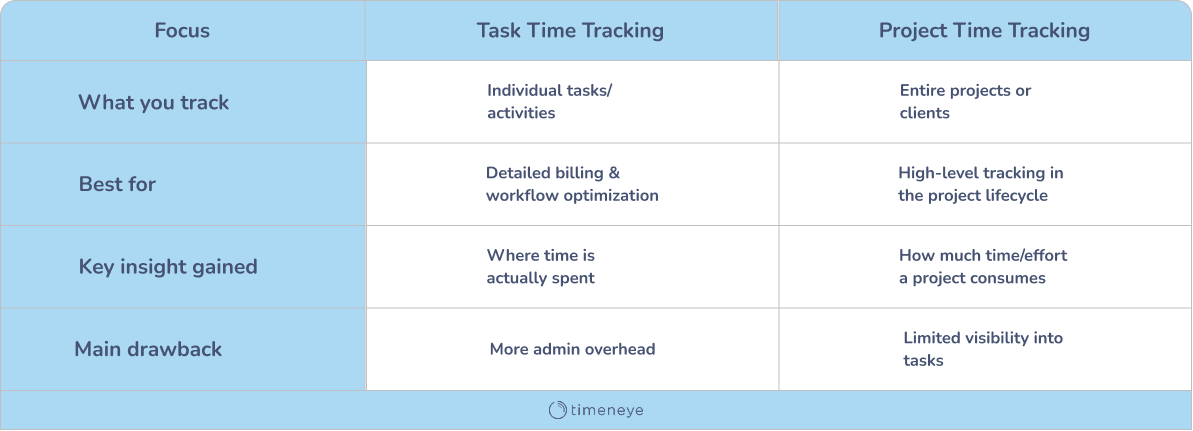
Task-level tracking means logging time against individual tasks or activities. For example, "Wrote blog post," "Client meeting," "Code review." This approach gives you granular visibility into exactly how time is being spent. You can see which types of tasks take longer than expected, identify where team members might need support, and get a detailed breakdown for client billing. Task tracking is especially useful for consultants who need to justify every billable hour.
The downside? Task-level tracking requires more effort. Employees need to remember to start and stop timers for each task, or manually log their activities throughout the day. If you're switching between tasks frequently, it can feel like administrative overhead.
Project-level tracking is broader. Instead of logging time against individual tasks, you track time against entire projects or clients. For example, "Project X," "Client Y." This approach is simpler and less intrusive - employees just select the project they're working on and let the timer run. It's easier to adopt and maintain, especially for teams that work on one project at a time or don't need hyper-detailed breakdowns.
The trade-off is less visibility. You'll know how much time went into Project X, but you won't know if most of that time was spent in productive work or endless meetings. You also can't analyze task-level inefficiencies or optimize specific workflows.
So which should you use? It depends on your needs:
- Use task-level tracking if you need detailed insights for billing, want to optimize specific workflows, or manage complex projects with many moving parts.
- Use project-level tracking if simplicity and adoption are your priorities, or if your work doesn't require granular breakdowns.
Many modern time tracking tools let you do both - you can track time at the project level but optionally add task details when needed. That flexibility gives you the best of both worlds: simple day-to-day tracking with the option to dig deeper when necessary.
Benefits of time tracking
Time tracking delivers value on two levels. Ask someone who's implemented time tracking what changed, and they'll usually start with the obvious stuff - billing got easier, payroll ran smoother, project costs became clearer. But give them a minute, and they'll tell you about the subtler, yet equally transformative ones like building transparency and trust across teams, and creating a data-oriented culture where decisions are grounded in facts rather than assumptions.
#1 Tracking for resource planning and cost control
From a strategic standpoint, time tracking transforms how businesses plan and scale. The real shift happens when you move from reactive management - scrambling when things go wrong - to proactive planning based on actual patterns. Case studies show companies implementing cloud-based time tracking saw 25% productivity increases within six months and roughly 10% reductions in payroll processing costs. That's the business value: spotting problems while you can still solve them cheaply, and seizing opportunities before they slip away.
#2 Time tracking to increase productivity
Productivity gains aren't achieved by squeezing more hours out of people - they come from eliminating the friction that slows everyone down. It's like realizing you've been driving with the parking brake on. Among the usual suspects (according to Harvard Business Review) is the "toggle tax" - employees spend nearly four hours a week reorienting themselves after context switching, equivalent to five working weeks lost per year. Once people see where hours actually disappear - endless status meetings, duplicate reporting, administrative busywork - they naturally redirect that effort toward work that matters. Patterns become impossible to ignore, and the fixes often turn out surprisingly straightforward.
#3 Time tracking for accurate billing and invoicing
For businesses that bill by the hour - consultants, agencies, law firms, creative studios - accurate time tracking is the foundation of revenue. The reality? There's usually a gap between what you do and what you invoice - hours that never get logged, work that doesn't make the final tally, charges clients push back on because you're penning them from memory. If a job takes 20 minutes longer than estimated and you complete ten similar assignments weekly, you're missing 170 hours annually. Time tracking for billing and invoicing closes this gap, helping teams capture billable hours, syncing them to billing systems, and generating records that hold up under scrutiny.
#4 Using time data to improve project cost management
Time tracking helps you manage project costs proactively. When teams track time by project or task, you see how effort connects to outcomes and costs relate to value. This reveals project profitability, timeline drift, and scope creep before they impact margins.
Smarter forecasting is another direct consequence of using time data. Instead of ballpark estimates, you can base forecasts on actual historical hours. This is especially valuable for services teams, agencies, and cross-functional initiatives where effort is often distributed unevenly. You are able to price and plan accordingly from the start when you know that a certain type of project historically takes 40% longer than initial estimates.
And finally, project tracking at the task level reveals even more. You'll see which parts of projects take the longest, where handoffs get clunky, where effort is being duplicated, and where tasks slow down unexpectedly. The aggregate view shows patterns that shape business strategy - which project types are most profitable relative to time spent, where processes are inefficient, and how changes impact time usage.
#5 Boosting accountability and transparency with time tracking
Transparency builds shared understanding of workload, progress, and contribution. For employees, time tracking creates an objective record that protects them - documenting contributions, highlighting when they need support, and ensuring proper recognition. For managers, time data supports better, fairer decisions. Instead of vague critiques, managers can point to specific metrics and collaborate on solutions. But transparency requires trust. Research shows 40% of employees suspect employer surveillance, even when no tracking exists. Clear policies with shared visibility remove ambiguity and reframe tracking as a tool for fairness, not oversight.
#6 Identifying wasted time and work bottlenecks
Time tracking spots inefficiencies that would otherwise stay invisible - the small tasks, interruptions, and context-switching that quietly drain hours, plus the workflow bottlenecks where work consistently slows down. Companies implementing cloud-based time tracking have seen 30% reductions in time theft and 15% improvements in payroll accuracy. When individuals review their own time logs, they often discover habits they didn't realize they had - two hours daily in reactive email mode, unnecessary meetings, low-priority busywork.
Use Cases for Time Tracking
Time tracking delivers practical, measurable applications in many use cases, from employees and freelancers to remote teams and project managers. At its core, time tracking is a simple habit: recording what was done, for how long, and why. But this simple habit unlocks clarity, fairness, and better decision-making at every level.
Below are the main use cases where time tracking consistently proves valuable. Which one applies to you and your team?
For employees:
On the surface, time tracking for employees may seem like one more task added to an already full day. In reality, it removes ambiguity from daily work and creates transparency for both employees and employers. For starters, time tracking brings fairness and clarity to the work reporting: a reliable time tracking tool provides a clear record of what someone worked on, for how long, and how those hours were distributed across tasks, projects, or phases. This supports employees when reporting their workload, and reduces disputes around what “should” have been done. Time tracking software typically allows users to track time for projects, phases and even at the individual task level, which helps employees identify which responsibilities take the most time. On the employer’s side, accurate time logs make payroll, and overtime calculations straightforward.
For Freelancers/Consultants:
Professionals who bill by the hour depend on accurate time tracking. They use it to avoid the risk of undercharging, over-servicing clients, or losing track of what has and hasn’t been completed. Time tracking tools allow freelancers and consultants to record billable work and apply hourly rates automatically, making it easy to calculate billable totals. In addition, many time tracking tools integrate (or can be easily connected) with invoicing software, transforming billing totals into invoices to get paid. This saves hours of manual calculation and reduces errors. Lastly, time tracking tools help in building transparent relationships with clients: itemized entry lists show exactly what work was completed and what was charged. When clients see how their investment transforms into actual work, trust improves, and billing disputes become rare.
Remote teams:
Distributed teams face a unique challenge: staying aligned without being in the same room, country, or even time zone. Remote and hybrid teams can hardly keep aligned and provide updates via email. Meanwhile, remote managers cannot constantly stress and wonder, “What is my team across the ocean working on ?” Time tracking in remote teams helps bridge these gaps by providing regular, structured updates that don’t rely on synchronous communication. Team members can log their hours, submit timesheets, and record progress in a cloud tool that everyone can access. This fosters trust, not micromanagement: employees maintain autonomy, while managers have the visibility they need to guide the team effectively. For hybrid teams, it ensures consistency: whether someone is in the office or across the world, their work is documented the same way. As remote and hybrid work become more and more common (according to Yomly, remote work has more than doubled since the pandemic), so does the need for efficient time tracking tools.
Project Managers:
For project managers juggling multiple projects, preventing scope creep and cost overruns is a constant challenge. Time tracking in project management becomes indispensable by providing real-time visibility into how much time is spent in each project, allowing for immediate adjustments to keep projects on track. When teams log the time spent in each phase and task, project managers can see in real time whether a task is taking longer than estimated, whether resources are stretched thin, or if certain activities are consuming more budget than planned. This visibility allows for early interventions like adjusting deadlines, reallocating team members, or resetting expectations with stakeholders before a small issue becomes a major problem. Time tracking also creates a library of historical data that supports better planning: future project estimates become more accurate, workloads more realistic, and timelines more credible.
Individuals:
Beyond company-wide applications, time tracking provides benefits in terms of personal productivity. First, the simple act of recording time increases self-awareness: workers begin to see how much time tasks truly require, where their focus tends to shift, and which parts of their day are productive or draining. The human brain naturally struggles with estimating time, leading to wrong estimates and assumptions. This doesn’t happen with clear, objective data that comes from a time tracking tool. Time tracking also encourages healthier boundaries. When someone sees that their days consistently run long, they can make informed decisions about what to change, whether that means delegating, speaking with a manager, or adjusting priorities. For people who struggle with staying on task, time tracking acts as a gentle accountability tool: knowing that time will be logged often helps maintain focus and reduce multitasking.
Challenges & criticism of time tracking
Like any workplace system that changes how people work, time tracking comes with its share of skepticism and legitimate concerns. The good news? Most of these challenges are predictable and manageable when you approach them strategically. Let's break down the most common challenges and explore practical ways to overcome them, by following the basics of employee time tracking best practices.
Challenge #1: Employee resistance
The response to leadership announcing a new time tracking system is rarely enthusiastic. Some employees have experienced time tracking as a source of control and criticism in past roles. Others see it as a sign of distrust and erosion of personal autonomy. The transition brings up fears about job security, especially during economic uncertainty. People wonder: are they tracking our time to identify who to cut? Is this preparation for layoffs? Will slow days become evidence of redundancy? Without clear communication, employees fill the information vacuum with worst-case scenarios, and ambiguity breeds anxiety and resistance.
The psychological roots run deep. Time tracking makes the workday visible in a way that might feel intrusive, putting pressure on employees to account for every minute. This increases stress, diminishes creativity, and makes them feel policed. When you've spent years managing your own schedule and suddenly need to justify where every hour goes, it feels like management doesn't trust you to do your job.
How to overcome it
- Be honest and specific - Skip corporate speak. Explain the real problem: "We're losing money because we can't accurately estimate project timelines or price services properly."
- Align leadership first - Ensure managers give consistent messages and include themselves in tracking. When senior leaders track time too, it signals fairness, not surveillance.
- Show personal value - Employees need to see how it helps them: proof when overworked, data for workload discussions, protection against burnout.
- Involve employees early - Let them help choose and test the system. Small adjustments like disabling screenshots can turn skeptics into supporters.
- Start with a pilot - Test with one team, address concerns quickly, then expand once stable.
- Recognize compliance - Acknowledge teams who consistently log time, whether through simple thanks or formal recognition.
Challenge #2: Risk of micromanagement if misused
Perhaps no criticism of time tracking is more pervasive than this: it's just micromanagement rebranded as data collection. And, honestly? Sometimes it is. Time tracking gets a bad rap for being a form of micromanagement, and there's a fine line between tracking time for efficiency and tracking time to control employee behavior.
In the right hands, time tracking means transparency, efficiency, and profitability, but too many companies turned it into a soul-crushing, morale-killing micromanagement activity. The signs are unmistakable: managers using real-time data to constantly redirect employees' tasks, interrupting work with questions about how they spend their time, requesting multiple updates on projects daily, or using time tracking reports to pit employees against each other.
The problem isn't the tool, it's how it's wielded. When managers interpret more hours as better performance, people game the system. They stay logged in longer, pad time entries, or avoid deep work that might show fewer hours but better results. If the unspoken message is more hours equals better performance, productivity doesn't directly correlate to raw hours—it's a ratio of outputs per hour, and raw hours only mean something if they're proportionate to the output one creates.
How to overcome it:
- Clarify purpose upfront - Frame tracking as a tool for understanding work patterns and improving workflows, not policing behavior.
- Focus on outcomes, not hours - Celebrate employees who complete work efficiently in less time, don't punish them with more assignments.
- Choose flexible systems - Simple tools that integrate seamlessly and give employees control: pause tracking, choose methods, hide private activity.
- Train managers properly - Use time data for coaching conversations about workflow improvement, not for calling people out. It's a feedback tool, not a weapon.
- Identify burnout risks - Use data to spot patterns of excessive hours and intervene early, positioning tracking as protective rather than punitive.
Challenge #3: Privacy and data security
Employee time tracking software collects sensitive information such as personal details, work schedules, and location data, and a breach or unauthorized access can lead to significant legal and financial repercussions. With cybercrime damages projected to hit $10.5 trillion annually by 2025 and small and medium businesses as prime targets, the security stakes couldn't be higher.
The privacy concerns are legitimate and multifaceted. Companies have always been suspicious of their employees, but now they have the tools at their disposal to actually track what employees are doing, both at their computers and away from it. Some time tracking tools include invasive features: automatic screenshots capturing images of employees' screens at intervals, activity logging measuring keyboard and mouse usage, GPS monitoring tracking mobile workers, and even webcam surveillance. These features are designed to ensure productivity and security, but the integration of surveillance-oriented features raises complex questions about data privacy, employee trust, and regulatory compliance.
The regulatory landscape adds complexity. Work time data is considered personal data and falls under the protection of the General Data Protection Regulation in Europe, and companies must ensure that data processing is lawful, fair, and transparent. Different regions have different requirements—biometric time clocks are banned in some states including New York, Oregon, Illinois, and Washington, and violations carry steep penalties. Companies found violating Illinois's biometric privacy law can face fines up to $5,000 per employee.
Beyond legal requirements, there's the human element. An Express VPN survey revealed that 59% of employees feel anxious or stressed about their employer monitoring their online activity. Even when tracking is legal and disclosed, it can damage trust if employees feel their every move is being watched.
How to overcome it:
- Start with transparency and consent - Be upfront about what data you're collecting, who can access it, and how long you'll keep it. Collect only what's necessary.
- Choose privacy-focused tools - Look for encryption, secure access controls, and compliance with relevant laws (GDPR, etc.). Not all tools treat privacy equally.
- Implement strong security - Encrypt data in transit and at rest, limit access by user role, require strong passwords, and conduct regular security audits.
- Control visibility - Let employees see only their own data, not colleagues'. Give them the ability to view, correct, or request deletion of their tracked time.
- Minimize surveillance features - Skip screenshots unless absolutely necessary. Focus on project time and task completion, not monitoring every click.
- Set clear retention policies - Keep data only as long as needed for payroll, projects, or legal compliance, then securely delete or anonymize it.
- Provide privacy training - Walk employees through how their data will be protected and used. Schedule regular refreshers when practices change.
Challenge #4: Inaccuracy
Even the best time tracking system is worthless if the data isn't accurate. And accuracy problems are remarkably common: according to a QuickBooks Time survey, only 9 percent of business owners say they never have timesheet errors, while 40 percent deal with them at least once a week. The most common culprit? Employees simply forgetting to clock in or out, cited by 34 percent of business owners. It's rarely malicious: people get absorbed in their work, switch tasks without logging the change, or estimate hours at the end of the week instead of tracking in real time.
Manual systems make things worse. Paper timesheets and spreadsheets are tedious and error-prone: illegible handwriting, calculation mistakes, and the sheer drudgery of the process all contribute. According to the American Payroll Association, manual time tracking errors can cost businesses up to 7% of their total payroll each year. That's not just about dollars: it's about trust eroding on both sides.
Technical issues and poor training compound the problem. Systems crash, integrations break, and when tools fail, people fall back to guesswork. Meanwhile, employees who don't understand the categories or aren't sure how to handle breaks and interruptions will make mistakes, not out of negligence, but confusion.
How to overcome it:
- Automate wherever possible - Automated clock-in/clock-out features integrated with smartphones or biometric scanners shift tracking from active chore to passive process.
- Select intuitive systems - Clean interface, minimal training needed, mobile-friendly. Check real customer reviews for reliability.
- Set up reminders - Automated email or push notifications help employees remember to log time without managers nagging.
- Use advanced controls when needed - Geofencing for location-based tracking, biometric authentication to prevent buddy punching, system integrations to avoid manual data re-entry.
- Provide training and support - Explain both how and why accurate tracking matters. Offer demos, guides, and accessible support when issues arise.
- Create feedback loops - Run periodic audits to catch errors early. If multiple employees struggle with the same feature, that's a system design issue, not user error.
Challenge #5: Overemphasis on hours instead of outcomes
Here's a paradox: time tracking is meant to improve productivity, but it can actually undermine it by fixating on the wrong metric. Measuring productivity in hours is a legacy of the industrial era, where outputs were directly tied to physical labor and time on the factory floor. In today's knowledge economy, that model breaks down. It penalizes efficiency: employees who complete tasks quickly get loaded with more work or judged as slacking; it fosters presenteeism, where people feel compelled to be online even when they have nothing meaningful to contribute.
A software developer who writes clean, efficient code in four hours is objectively more productive than someone who spends eight hours fixing avoidable mistakes. Yet many organizations still conflate hours with output. Managers look at time logs and assume the person working 55 hours is contributing more than the one working 40, regardless of actual results. This creates a culture where people game the system: staying logged in longer, scheduling unnecessary meetings to look busy, or stretching tasks to fill available time. Efficiency becomes a liability instead of an asset.
The consequences are real. Overwork leads to burnout, higher turnover, more sick days, and declining creativity. Research from Stanford economist John Pencavel shows that productivity drops sharply after 50 hours per week and falls off a cliff after 55 hours. Those working 70 hours produce no more than those working 55.
- Define success by deliverables - Establish KPIs tied to business priorities: projects completed on time and budget, work quality, client satisfaction, not hours logged.
- Use data to optimize, not police - Identify inefficiency patterns (tasks taking too long, excessive meetings, context-switching) to streamline workflows, not criticize individuals.
- Reward efficiency - Celebrate quality work completed ahead of schedule. Don't punish efficiency with more assignments. Offer flexible arrangements where possible.
- Change performance conversations - Replace "you only logged 38 hours" with "you delivered early and it was excellent—what enabled that efficiency?" Focus on impact, not activity.
Time tracking tools & software
We’ve already discussed the different ways and challenges of using time tracking in a company. Once you decide that tracking software will serve your needs, the next step is choosing “The One” to do it. While some businesses still rely on spreadsheets or manual logs, most find these methods too slow, prone to errors, and hard to scale. Time tracking software solves these problems by making recording, reviewing, and reporting time faster and more accurate. This is especially valuable for small businesses, where every hour and every invoice matters. (We’ll talk about that more in detail later).
How do you find the right time tracking tool?
There is no single “best” system: the ideal solution depends on your team size, the nature of your work, your billing processes, and how much structure you require. Instead of chasing the most advertised or complex tool, focus on practical features that support everyday use. Consider prioritizing:
- Simple time entry/log input: Time tracking should not feel like a hassle. Look for tools with one-click timers, quick manual input options, and automatic features
- Availability across devices: Employees work from desktops, laptops, tablets, phones, outside and inside the office. A good time tracker works across platforms, wherever your team is working.
- Useful reporting and analytics: Dashboards, charts, and exportable reports help you understand how time is spent and where improvements can be made. These don’t need to be flashy: just clear, accurate, and easy to filter.
- Fast team onboarding: The tool should be easy to adopt. Features like importing users from Microsoft 365 or other existing systems reduce setup effort.
- Automation options: Features such as reminders, budget alerts, or automated approvals help reduce administrative work and make time tracking more consistent.
- Guidance and support: Look for help materials, tutorials, or support channels. Teams are far more likely to use the tool correctly if they can easily find answers.
A quick overview of widely used time tracking tools
Once you know what you need, the market offers plenty of options. The sheer number of tools can feel overwhelming, so it helps to rely on user reviews, comparison sites like Capterra, or software shortlists to narrow your choices. Creating a small shortlist—two or three tools at most—allows you to test them, gather feedback from your team, and choose confidently.
Here are a few well-known tools worth considering:
Track
Track is a top choice for teams working heavily within the Microsoft ecosystem. It offers straightforward time tracking, project and phase management, customizable reports, and visibility into budgets or profitability. Alerts warn you when hours or budgets are close to exceeding limits. Each minute tracked is linked to the right project, client, and task, helping managers spot inefficiencies without micromanaging people. Track integrates with Microsoft Planner, Azure DevOps, Microsoft To Do, Outlook Calendar, and even embeds its tracking features inside Microsoft Teams.
Toggl Track
Popular among freelancers, designers, and small teams, Toggl Track combines ease of use with strong reporting and a generous free plan. It allows users to categorize billable and non-billable hours, track projects, and assign rates. Its automatic tracking feature reduces manual effort by capturing time spent in different applications. Toggl also exists within a wider suite that includes Toggl Plan for lightweight project planning.
Harvest
Harvest is particularly valued by consultants and businesses that bill clients regularly. It supports both manual and timer-based tracking, includes expense recording, and generates invoices directly from logged hours. Managers can view summaries, approve timesheets, and compare effort against estimated budgets. Its balance of tracking and billing features makes it a practical option for service-based teams.
Clockify
Clockify is known for its free plan, which covers time entries, reporting, basic project management, and integrations with many common tools. It supports billable tracking, attendance, scheduling, approvals, and even optional features like automatic tracking and GPS/location tracking. Its affordability and broad feature set make it appealing to smaller businesses that need functionality without a high price.
TrackingTime
TrackingTime offers automatic, multi-platform time tracking that covers basic project management, invoicing, and attendance. Its integrations with Trello, Asana, Slack, and other tools create a connected workflow for teams already using digital task systems. It even includes a ChatGPT-based assistant, aimed at simplifying activity logging.
Jibble
Jibble positions itself as an all-in-one attendance and productivity tracker. It supports screenshots, biometrics, and multiple clock-in options such as QR codes, RFID, or PIN entry. Because of its emphasis on oversight and attendance accuracy, it tends to appeal to industries that need reliable proof of work or on-site verification.
Do small businesses really need time tracking?
Many small business owners hesitate. It’s an understandable concern: time tracking may feel like an extra layer of admin that only large enterprises need. But the opposite is true: small teams benefit significantly because they lack the buffers that bigger companies have. Every hour miscounted, invoice forgotten, or payroll mistake has a greater impact.
A time tracking tool helps small businesses:
- Record work more accurately
- Reduce billing errors
- Improve payroll consistency
- See where time is wasted
- Make better staffing and pricing decisions
Time tracking tools come in many pricing tiers, and most include free plans and free trials: so adoption doesn’t need to be expensive. Even simple tools can transform how small teams understand their workload and value their time.
Integrations and technology
At this point, one thing is clear: modern time tracking tools do far more than record hours: they help teams quietly streamline and improve work in the background. Because tracking time should never feel like a hassle, most software providers offer integrations that allow users to log time where they already work: inside their project boards, task lists, communication platforms, billing systems, or side-by-side with their calendar. Instead of switching between windows or copying entries manually, tracking becomes a natural, seamless part of the workflow.
These integrations happen through various methods: native connections to other software, browser extensions, native apps for platforms like Microsoft Teams, and open APIs for organizations that want to build custom links themselves. Regardless of how they are implemented, the role of integrations is simple: reduce friction, remove manual effort, and make time tracking as easy as possible.
Project management integrations
Project management platforms constitute one of the most common and impactful integration categories. Tools like Asana, Trello, Jira, Microsoft Planner, or Basecamp allow teams to plan and assign work, but their built-in time tracking capabilities (if and when they exist) are usually minimal and not the core focus of the platform. Because of this, many time tracking tools connect directly into project management systems to allow hours to be logged against tasks, projects, and milestones.
This is important because knowing where time is spent is as important as knowing how much was spent. When time tracking tools integrate with PM software, teams can measure which activities take longer than expected, whether workloads align with budgeted hours, and if contracts are being fulfilled according to the agreed-upon timeframes. Some tools, like Track, even enable tracking at the phase level, giving project managers a clearer view of effort distribution.
These project-level insights also help with forecasting. When estimated hours consistently differ from actual logged hours, leaders can sound the alarm and refine future project quotes, pricing, staffing, and scheduling. Instead of relying on instinct, teams forecast based on actual data.
The image below shows, for example, the Track integration with Microsoft Planner:
.png?width=962&height=684&name=timeneye%20widget%20in%20planner%20(1).png)
ERP and HR system integrations
Time tracking does not end with individual task measurement. The same data becomes valuable once connected to ERP systems. When time entries sync with ERP software, organizations gain an overall view of how effort is used across functions, departments, or clients. This enables capacity planning, cost allocation, and performance analysis rooted in factual data rather than assumptions.
HR systems benefit in a different but also practical way. Through integrated time data, attendance, overtime, leave, and payroll calculations can happen more accurately and automatically. Meanwhile, employees have greater confidence that pay reflects their actual work.
Calendar integrations
Time tracking can be integrated with calendars to track down the 1 time waster in the office: meetings. Atlassian research based on 5,000 workers across four continents found that 78% of respondents attend so many meetings that it becomes difficult to complete actual work. Yet, meeting time often goes unrecorded.
Calendar integrations change this. When a calendar connects to a time tracking tool, events can be tracked manually or automatically. Meetings become part of the timesheet, not forgotten blocks of time. This allows companies to see how much time meetings consume, whether sessions frequently overrun their scheduled time, and which categories of meetings contribute most to workload.
For businesses that bill client-facing time, this is especially valuable: meeting hours can be counted as billable and invoiced accordingly, not lost simply because no one wrote them down.
Reporting and analytics Integrations
Time data is rich with insight, but only if it can be visualized and interpreted clearly. While most time tracking platforms offer built-in reporting functions, connecting them to visualization or business intelligence tools like Microsoft Power BI or Tableau allows deeper analysis tailored to specific teams.
A finance department, for example, can link time data to Power BI and examine the cost of labor per project, margin trends, or which types of projects contribute most to profit. Because this reporting is based on live or recently synced time data, decisions are grounded in reality rather than speculation.
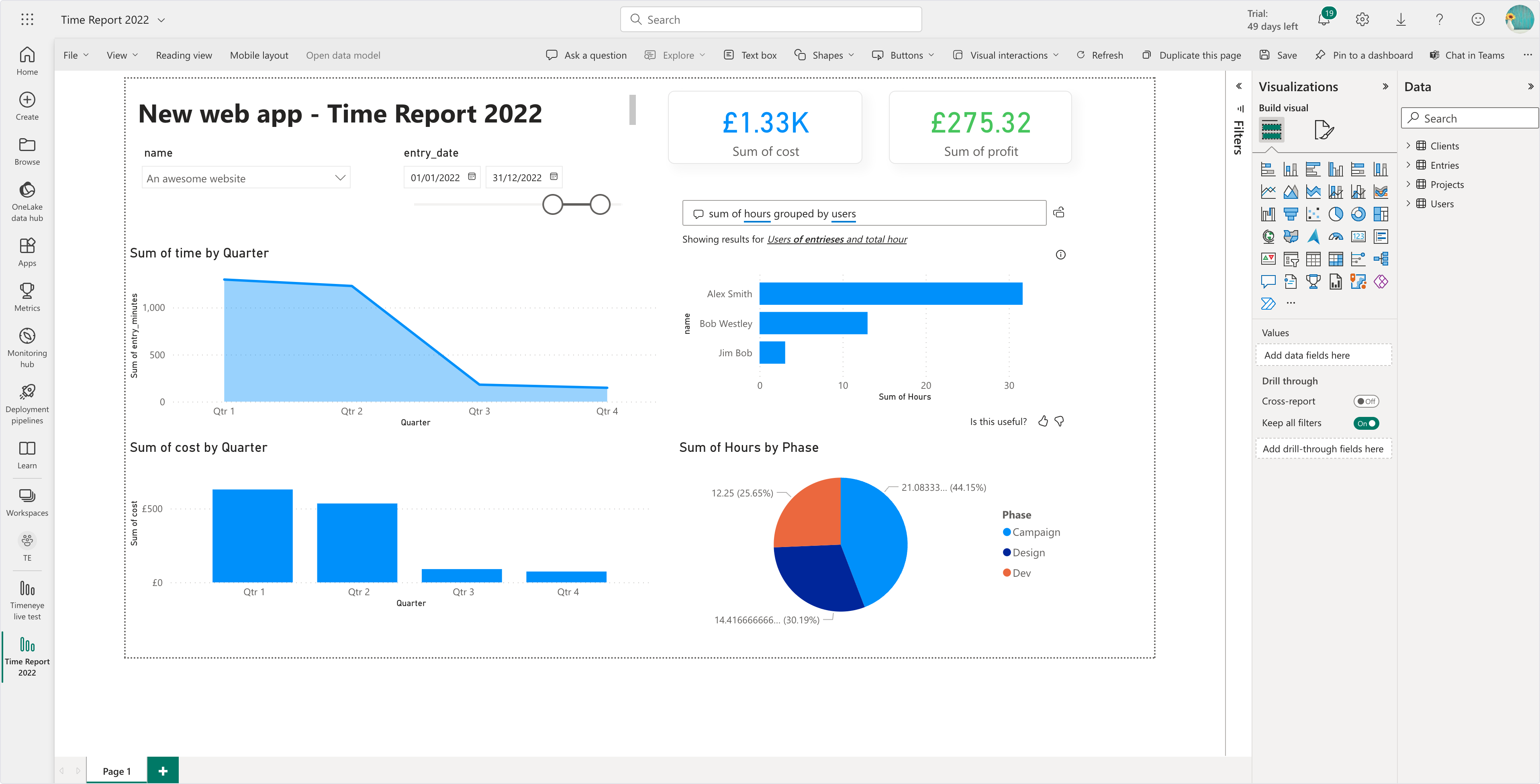
Productivity dashboard built in Power BI
Best practices when rolling out time tracking
If you want your time tracking software rollout to succeed, how can you do it to make sure your time uses it and actually sticks to it?
Success will depend on how well the rollout is planned, communicated, and supported. When done correctly, time tracking becomes a helpful habit rather than a forced obligation. The following best practices offer a practical roadmap for introducing, managing, and maintaining an effective time tracking process.
- Step 1: Start Small, Scale Later
Every rollout benefits from testing before a full launch. Begin with a small pilot group representing different roles (ideally including managers, a few everyday users, and IT). This allows you to explore the software in real conditions, validate whether the setup supports real workflows, if the tool meets the security/integration standards you need, and refine your configuration without involving the entire organization.
Your Pilot group can explore features such as time input methods, approvals, reporting, automations, and integrations. Their feedback helps identify early issues: do task categories need refining? Is reporting configured correctly? Are permissions set appropriately? Involving IT ensures security and integration concerns are handled upfront, while involving managers gives insight into what reporting and oversight needs truly look like.
When your testing period is done, and you know your features are solid and the tool is set up properly, you can move to onboarding the rest of the organization.
- Step 2: Communicate With the Team
When it’s time to expand the rollout, do not assume adoption will happen automatically. People track time more willingly when they understand the purpose, expectations, and value.
Before inviting the wider team, explain:
- Why time needs to be tracked
- How tracking benefits both the business and employees
- What accuracy standards matter
- How frequently timesheets must be completed or approved
- Whether comments, attachments, or tags are required
It is helpful to write these rules into a simple, clear “time tracking policy.” Pilot users can review it first, so gaps are caught before publishing. A policy anchors expectations, eliminates ambiguity, and becomes reference material for new hires or managers.
- Step 3: Train and Support Your Team
Even the easiest, most intuitive software still requires guidance. Teams should not be left to figure out how to track time efficiently on their own. So host training sessions, live demos, and share any practical guides or best practices you have at hand. Most software offers extensive time tracking resources on their websites in the form of knowledge bases, video tutorials, or even sessions that can be booked on demand (or sometimes even for free).
Consider screenshot-based guides or short Loom videos showing everyday tasks: starting timers, editing entries, approving timesheets, analyzing reports, or using integrations. Keeping these materials accessible helps ongoing adoption and reduces support questions.
- Step 4: Build Habits, Not Just Procedures
A common problem for teams that track their time is how difficult it is to remember to track time daily, especially on busy days, especially tracking wasn’t really part of the organization’s processes. More often than not, teams remember time tracking only at the end of the week (or worse: at the end of the month!), leading to rushed guesses and unreliable data. Encourage employees to track as they go, not retroactively. Ask them to enable built-in reminders and automated notifications, as well as install browser extensions when available. Mobile can help for field workers or frequent travelers to track time wherever they are.
- Step 5: Gather Feedback and Iterate
Rollout is not the end, it’s the beginning of your journey to better, more reliable productivity data. Continuous improvement matters, so make sure to invite feedback regularly: what is confusing, what wastes time, what categories seem unhelpful, what automation could be added?
Be open to suggestions and even complaints. Adjust workflows based on what you hear. Maybe task labeling needs simplification. Maybe approvals are too rigid and slow. Your goal is not to force the tool onto people but to shape the tool to support their work.
.png?width=655&height=902&name=Checklist%20for%20trial%20journey%20(1).png)
Deployment checklist for a 14-day rollout
How to make sure time tracking doesn’t kill employee motivation
Time tracking succeeds only when it supports (not suffocates!) your team. Remember: killing the enthusiasm over your shiny, new time tracking tool can be just as easy as implementing it correctly.
This is where the attitude and example the leaders of the team, can make a difference.
Managers need to resist the temptation to scrutinize minute-by-minute activity or use time logs punitively. Time tracking thrives when leaders show transparency and accountability themselves. If managers lead by example and track their own time openly, showing how they use the insights constructively, teams are more likely to mirror that behavior.
Frame time tracking as a tool for clarity, not surveillance. Emphasize that honest reporting matters more than ideal numbers. Encourage employees to record real effort, including time spent on unexpected delays or administrative tasks, without fear of negative consequences.
In practice, this means that to stop obsessing over the individual minutes tracked, but rather focus on the results and ask:
- Are projects delivered within expected hours and budgets?
- Do recurring delays reveal capacity gaps or unrealistic planning?
- Are some tasks consistently underestimated?
- Are workloads distributed fairly?
These insights support learning and improvement. A manager constantly policing entries sends the opposite signal, that surface-level tracking matters more than effectiveness.
But when time tracking is implemented thoughtfully, it becomes something employees rely on and not something they tolerate.
Time tracking strategies & productivity methods
Time tracking isn't just about logging hours, it's a foundation for working smarter. When paired with proven productivity methods and thoughtful analysis, time data becomes a powerful tool for improving how work actually gets done. This section explores how to combine time tracking with popular productivity techniques, distinguish between billable and non-billable work, align your data with business KPIs, and turn time logs into a catalyst for continuous improvement.
From logging hours to improving workflows
The real value of time tracking emerges when you use the data to optimize how you work, not just to document what you did. Instead of treating time logs as a record-keeping exercise, think of them as a feedback loop that reveals patterns you'd otherwise miss.
A good starting point is the weekly review. Set aside fifteen minutes to look back at where your time actually went versus where you intended it to go. You'll likely spot tasks that consistently run longer than expected, worth examining for process improvements or delegation. You might notice patterns in your energy levels too: if your sharpest hours are in the morning, that's when you should be tackling complex work, not clearing your inbox. And then there are the time sinks: meetings that could've been emails, constant context-switching, small interruptions that fragment your focus. Time data makes these visible so you can do something about them.
Time tracking also helps you get realistic about capacity. When you know how long recurring tasks actually take—not how long you think they should take—you can plan more accurately, set better deadlines, and stop overcommitting. This shift from guesswork to data-driven planning reduces stress and improves both the quality and consistency of your output.
The Pomodoro Technique with time tracking
The Pomodoro Technique, developed by Francesco Cirillo in the late 1980s, breaks work into focused 25-minute intervals (called "pomodoros") separated by short 5-minute breaks. After four pomodoros, you take a longer 15–30 minute break. The method creates artificial deadlines that combat procrastination, enforces regular rest, and makes progress tangible. You can literally count how many focused sessions you completed.
Research backs this up. A study in the British Journal of Educational Psychology found that pre-determined, systematic breaks resulted in lower fatigue and higher concentration compared to self-regulated breaks, with similar task completion in less time. The structured nature essentially gamifies productivity, creating focused parameters around your workload.
Time tracking software enhances the technique by automatically logging your focused intervals. Over time, you'll see which tasks require more pomodoros than others, when your focus tends to wane, and how interruptions affect your output. This data helps you refine estimates and protect your most productive periods.
Time blocking with trackers
Time blocking takes a different approach: instead of fixed intervals, you divide your day into dedicated blocks for specific tasks or types of work. Cal Newport, author of Deep Work, has championed this method for over a decade, arguing that giving every minute of your workday a job creates clarity, reduces decision fatigue, and helps you resist the pull of distractions. The key is single-tasking. When you're in a block dedicated to writing, you're not checking messages or jumping into meetings.
Time tracking validates whether your blocks are realistic. If your two-hour writing block consistently gets cut short, the data reveals that pattern so you can adjust. If certain blocks regularly run over, you know to allocate more time. Intentional scheduling combined with actual time data creates a feedback loop that makes your calendar increasingly accurate.
Tracking billable vs. non-billable hours
For service-based businesses, freelancers, and agencies, the distinction between billable and non-billable time is fundamental to profitability.
Billable hours are the work you can charge clients for:
- Project execution
- Client meetings
- Research directly related to their deliverables
- Revisions based on their feedback
Non-billable hours include everything else:
- Pitching new clients
- Internal meetings
- Professional development
- Administrative tasks
- Fixing mistakes that weren't the client's responsibility
Tracking both types of time is essential for understanding your true profitability. A project might look profitable based on the invoice, but if you spent an enormous amount of non-billable time on emails, revisions, or scope creep, the actual profit margin tells a different story. Without tracking non-billable work, you'll never see where your time is really going—and you can't fix what you can't measure.
The data also informs pricing and scoping decisions. If you consistently spend 20% of your project time on non-billable communication, you can either build that into your rates, set clearer boundaries with clients, or invest in tools that reduce communication overhead. If free deliverables (like complimentary audits or strategy sessions) are consuming more time than the paid work that follows, you might need to reconsider your offer structure.
.png?width=1422&height=701&name=fixed%20fee%20project%20monitor%202024%20(1).png)
Billable project and costs, in Track